What is a PSA or RMM? (and why they’re not enough)
If you’ve worked in IT or run an MSP for more than five minutes, chances are you’ve heard the acronyms: PSA and RMM. You're probably paying for both. But what exactly do they do - and more importantly, what do they not do?
Let’s break it down.
What is a PSA?
PSA stands for Professional Services Automation. Think of it as the command center for your operations.
A PSA helps you:
- Manage tickets
- Track time and billing
- Dispatch technicians
- Schedule projects
- Create invoices and reports
It's where your business processes live. Popular tools include ConnectWise PSA, HaloPSA, and Autotask.
What is an RMM?
RMM stands for Remote Monitoring and Management. This is the tech side of the house and the tool your team uses to:
- Monitor endpoints
- Push updates and patches
- Run scripts
- Install or remove software
- Get alerts when things go sideways
These tools let you manage infrastructure without physically touching it. Common RMMs include N-able, NinjaOne, and Atera.
You have a PSA and an RMM tool. What’s missing?
The short answer – context.
PSAs and RMMs are great at telling you what’s happening and when - but not why, how, or what to do about it. That’s where a dedicated IT documentation tool comes in.
Here’s what they typically don’t give you (or don't give you as well as a dedicated IT documentation software does):
- How-to processes for resolving recurring issues
- Asset relationships
- Detailed client info beyond basic fields
- Shared credentials, MFA notes, or access instructions
- Network diagrams, onboarding plans, or SOPs
- A place to store institutional knowledge that isn’t tied to a ticket or alert
Trying to document all of that in your PSA or RMM is like using a spreadsheet as a password manager. It technically works, but it’s not what it was built for.
Why is IT documentation still essential, even when you already have a PSA and an RMM tool?
Knowledge vs. data
PSAs and RMMs manage operational data (tickets, alerts, devices).
Documentation systems manage knowledge - how systems are set up, why things are configured a certain way, who to call, what the backup plan is, etc.
Example: Your PSA might tell you a ticket was resolved, but only your documentation tells how it was resolved, step by step.
Context & relationships
PSAs handle workflows. RMMs manage endpoints.
Documentation connects the dots: Which servers belong to which client, which user owns which machine, what services are running on each device and why.
It gives you the "big picture" view that PSAs and RMMs can’t provide alone.
Onboarding & offboarding technicians
With good documentation, new techs ramp up quickly and don't have to dig through ticket histories or guess at setup details.
Without it, tribal knowledge disappears when employees leave.
Security & compliance
Audit trails, password storage, change logs, and SOPs are often outside the scope of a PSA or RMM.
Documentation systems centralize and secure this info in a structured way.
Standard Operating Procedures (SOPs)
PSAs don’t store step-by-step instructions.
Documentation gives repeatable playbooks: how to configure a firewall, onboard a client, migrate mail, etc.
Non-device information
RMMs monitor systems. But where do you document:
- Domain info?
- Licensing details?
- Office floorplans?
- Wi-Fi credentials?
- Vendor contacts?
How Hudu complements your PSA + RMM
Hudu isn’t here to replace your PSA or RMM. It’s built to work alongside them by filling in the knowledge gaps and making your tools work better together.
With Hudu, you can:
- Document SOPs, diagrams, passwords, and structured assets in one place
- Create a central, searchable knowledge base for your team
- Sync companies, configurations, and contacts from supported RMM and PSA integrations, bringing all your data together in one unified source of truth
- Use the browser extension to access documentation while working tickets
It’s everything your PSA and RMM can’t do but wish they could.
Bringing it all together
Each tool in your stack plays a critical role, but they’re built for different jobs.
- Your PSA tracks the work.
- Your RMM monitors the systems.
- Your documentation platform connects the dots.
Here’s how they typically compare at a glance:
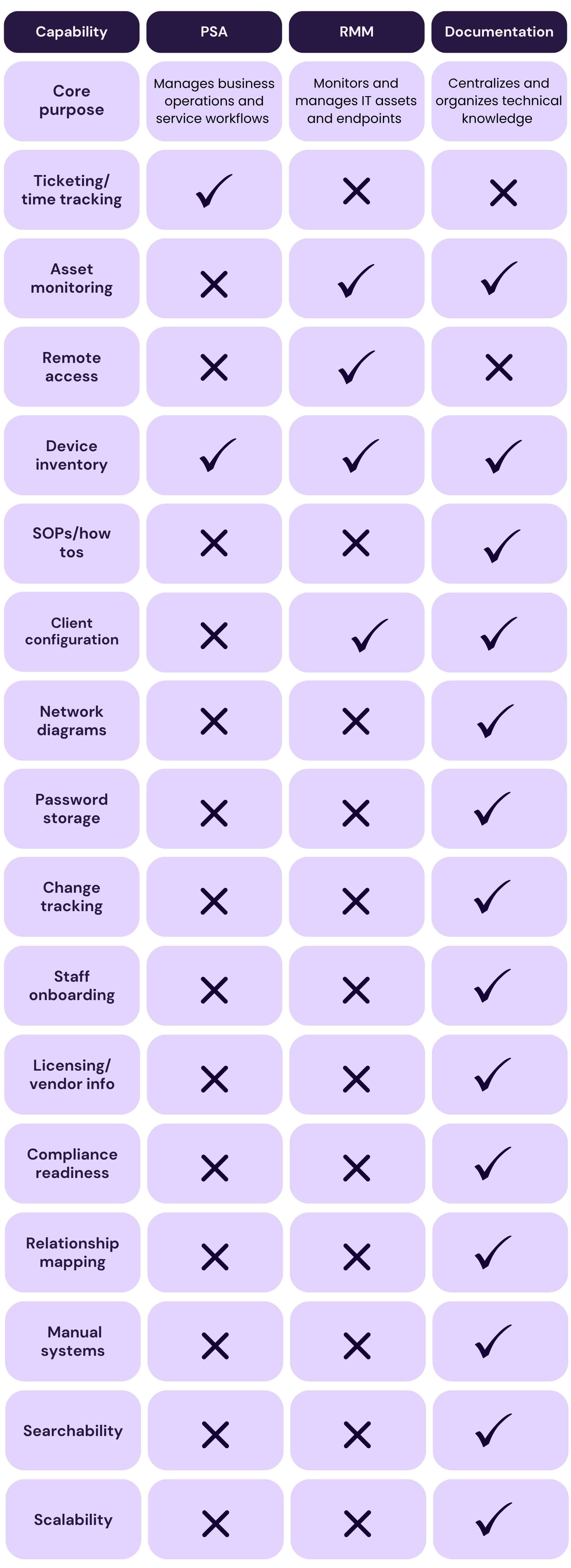
When all three are working together, your team gains speed, clarity, and consistency.
In the world of IT and MSPs, PSA and RMM tools are essential - but they’re not the whole story. While they help streamline service delivery and automate tasks, they leave a major gap when it comes to context, documentation, and knowledge sharing. Without a solid IT documentation platform to complement your PSA and RMM, you’re left piecing things together, relying on tribal knowledge, or losing time to manual workarounds. If you're serious about scaling efficiently and supporting your team long-term, it's time to look beyond just a PSA and RMM tool.