
Securing your Documentation
Tips & Tricks: Password Management
Straightforward tips for organizing, storing, and securing passwords so you spend less time troubleshooting access issues.
Password Security
Password protection has become continuously more important as our world adapts more and more to technology. Cyber threats are becoming more prevalent then ever, therefore, password protection and security has become more important than ever. In addition to the protections that Hudu offers to the instance itself, there are also many ways to protect your passwords, both internally and for your customers.
In terms of how Hudu protects your passwords, all passwords are protected with AES 256-bit GCM encryption. When sharing passwords out to end users or other employees, these passwords are encrypted at rest and in transit ensuring your passwords are heavily protected whether they are just stored in Hudu or being sent out to others. Hudu's password management section also includes a PWNED feature which is built-in dark web monitoring for passwords, adding additional visibility into weak or compromised passwords that may need to be changed.
Password Folders
A large focus on password management is making sure that your internal users (and perhaps external users added to your Hudu instance) are only able to see the passwords and OTP codes you choose to share with them. One method of accomplishing this is through password folders. Password folders act as the primary tool for password organization as well as setting permissions for your passwords themselves. Folders allow you to group clients' passwords, and can be created at a global level or at a client-specific level. Password Folders can only be edited and created by Admin and Super Admin. For users not permitted to access a folder, said folder will not appear for them. Here is a very basic example of a global password folder structure that you could use:
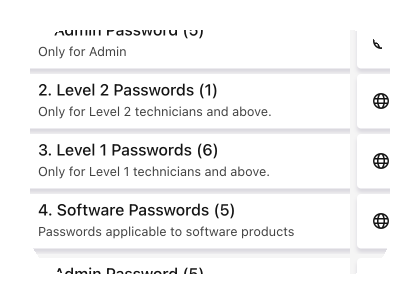
We recommend creating password folders in a way that you can always be sure of these things:
- What passwords should go in each folder (are my tech's going to be able to easily find the passwords they need?)
- What groups should have access to each folder
Password Permissions
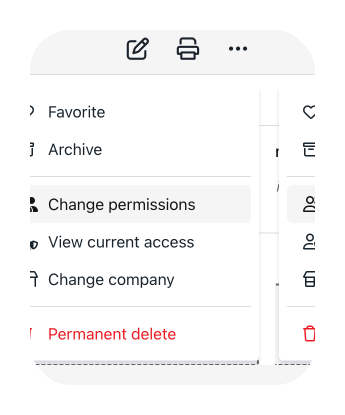
Password folders are a great way to bulk manage your internal password protection but you can also easily do this on a one-off level on any password as well. On any individual password entity, you are able to click the menu icon (three dots) and change the permissions for that password itself.
Password Defaults
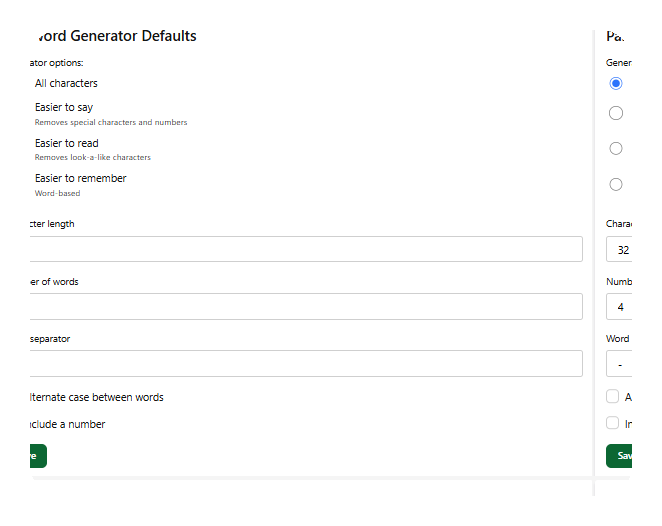
When creating passwords themselves in Hudu, you have the ability to use the password generator. Another security setting you can set up is password generator defaults. This will ensure that each time a new password is created in Hudu, the parameters of your passwords are the same. We recommend setting these defaults to make sure each password that is created natively in Hudu fit in with your company standards you have set for password management. You can customize defaults for:
- Generator Options
- All characters
- Easier to say
- Easier to read
- Easier to remember
- Password length
- Number of words
- Word separator type
- Case rules
- Number rules
OTP Codes
To go along with passwords, Hudu also has the ability for you to add in OTP codes to go along with a password. Our built-in TOTP generator allows for traditional OTP code viewing; as well as team collaboration and secure, external sharing. The secret key must be at least 16 characters long and use Base32 formatting. The ability to store OTP codes in Hudu allows your team to no longer have to ask for the OTP each time they need it. Instead, you can have it stored in Hudu where it can be easily accessible by anyone in your instance (that has the permissions to do so) saving time for your techs and ensuring that it is being protected through various security measures.
Migrating to Hudu? Yes, your OTP codes can come with you!
Summary
Overall, password security has never been more important and utilizing Hudu's password management feature allows you to have your passwords and OTP codes organized, protected, and locked down to the individuals on your team that truly needs access to them.
See what calm feels like
Give your team a documentation system they can rely on — during onboarding, incidents, and everything in between